Appearance
Get Started
This guide will instruct you through setting up and developing your Personal Features in Investec Online.
After completing this page, you should be able to:
INFO
For the purpose of this session, we will be referring to our SDK as the giga-sdk and not invsy-sdk which is not public. Both do exactly the same thing, they just have different namespaces.
You can still you use the invsy-sdk documentation as reference for giga-sdk which is mentioned later in this guide.
1. Create a new web application
As "Personal Features" is framework-agnostic, you can use any web framework of your choosing.
Create a new web application, here are some popular frameworks to get you started:
- Create a new application in Angular
- Create a new application in React
- Create a new application in Vue
- Create a new application in Svelte
- Create a new application in Next.js
2. Develop with the SDK and Investec Online
Install and initialize the SDK
Install the SDK using npm or yarn.
shell
npm i gigachat --save-devnpm i gigachat --save-devOnce installed, import the SDK into the main entry-point of you web application and initialise it.
ts
import { giga } from 'gigachat';

giga.platform.init().then(() => giga.platform.initSession())
import { giga } from 'gigachat';
giga.platform.init().then(() => giga.platform.initSession())Serve and view your application in Investec Online
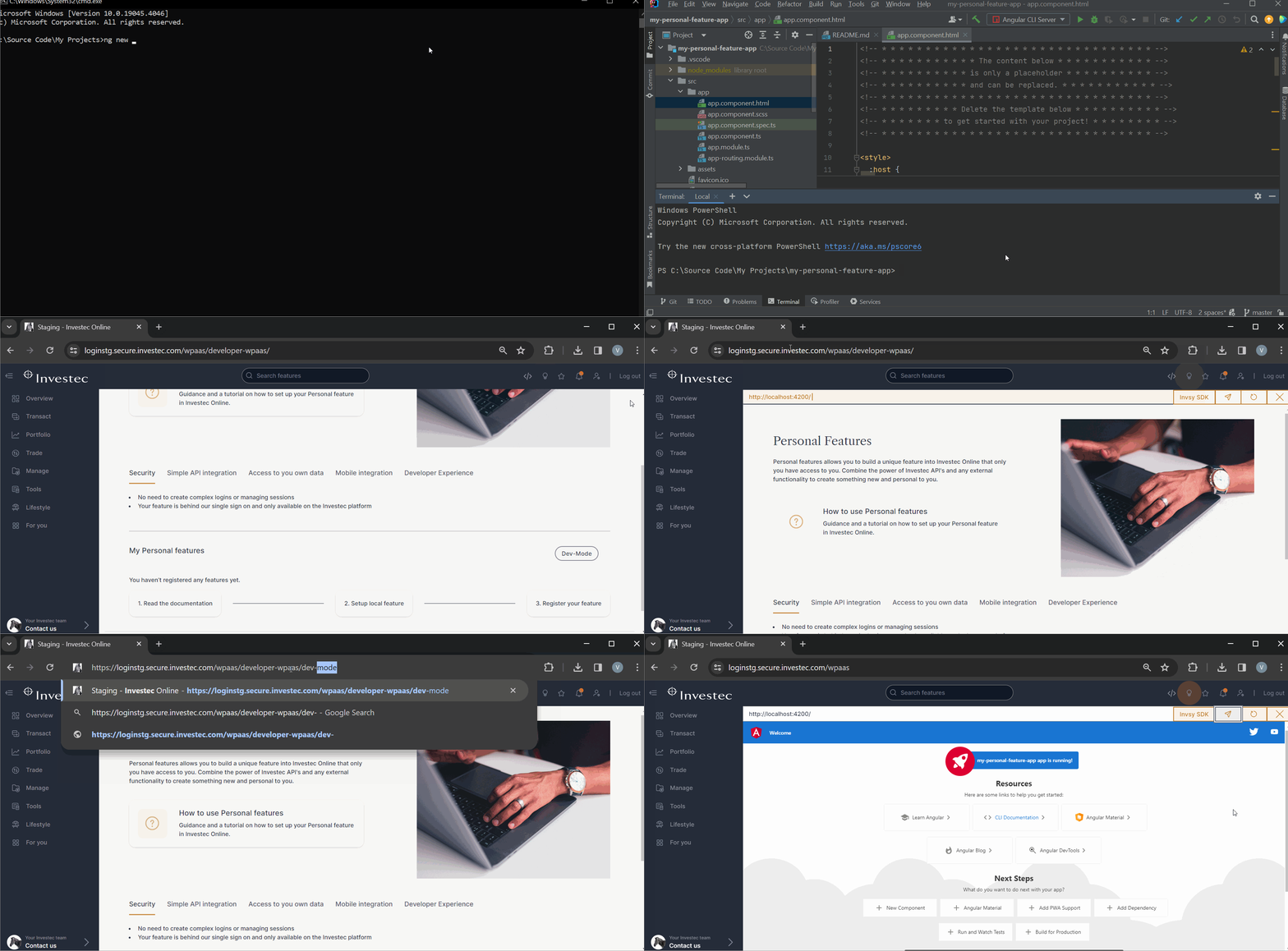
Serve your application on your local machine (e.g. npm run dev) and open the URL (e.g. http://localhost:PORT) in your browser, this should redirect you to Investec Online and enable the development mode.
Sign in and wait to be taken to the accounts overview page.
Input the URL of your local web application in the dev-mode address bar (Not your browser address bar). Hit "Enter" on your keyboard or click the submit button (Paper plane icon).
You should see your local web application inside Investec Online now.

Alternatively, you can enable development mode by appending /dev-mode (e.g. https://../private-cleint/dev-mode) in the URL address bar in your browser.

3. Fetching data with the SDK
The SDK communicates with the Investec Online platform and requests data from the platform on behalf of your web application. The platform then fetches the data and returns it to your web application.
Get your client details
The following will fetch your details from Investec Online and return it to your web application.
ts
giga.data.getClientBasicDetails().then((res:any) => {
    console.log(res.result)
})giga.data.getClientBasicDetails().then((res:any) => {
console.log(res.result)
})or
ts
const data = await giga.data.getClientBasicDetails()
const clientDetails = data.result
const data = await giga.data.getClientBasicDetails()
const clientDetails = data.resultGet your account information and list the transactions
The following will fetch all your accounts and transactions for the first account.
ts
async function getTransactionData() {
    try {
      const accountList = await giga.api.privateClient.pbsa.accounts.list();
      const transactions = await giga.api.privateClient.pbsa.transactions.get({
        accountId: accountList.result.PrivateBankAccounts[0].AccountNumberForRequests,
        dateFrom: '09/10/2022',
        dateTo: '08/11/2022'
      });
      return transactions.result;
    } catch (error) {
      console.error(error);
    }
  }
async function getTransactionData() {
try {
const accountList = await giga.api.privateClient.pbsa.accounts.list();
const transactions = await giga.api.privateClient.pbsa.transactions.get({
accountId: accountList.result.PrivateBankAccounts[0].AccountNumberForRequests,
dateFrom: '09/10/2022',
dateTo: '08/11/2022'
});
return transactions.result;
} catch (error) {
console.error(error);
}
}For a full list of all the capabilities and APIs in the SDK, you can open the live documentation inside Investec Online in within the development mode address bar by clicking the Invsy SDK button:
